How-to guidesकसे करावे

Multiple team login: one WhatsApp number, your whole team working togetherमल्टिपल टीम लॉगिन: एक WhatsApp नंबर, संपूर्ण टीम एकत्र काम करते

Give sales, support and marketing their own logins and roles on the same WhatsApp number — one shared inbox, role-based permissions and no shared passwords.सेल्स, सपोर्ट आणि मार्केटिंगला एकाच WhatsApp नंबरवर स्वतंत्र लॉगिन आणि भूमिका द्या — एकच शेअर्ड इनबॉक्स, भूमिकेनुसार परवानग्या आणि पासवर्ड शेअर करण्याची गरज नाही.

Tavros Connect team · 17 Oct 2026१७ ऑक्टोबर २०२६ · 3 min read१ मिनिटे वाचन

One business, one WhatsApp number, many people who need it: sales answering new enquiries, support helping existing customers, marketing running campaigns. Sharing one phone or one password is a recipe for confusion. Multiple teams login solves it.
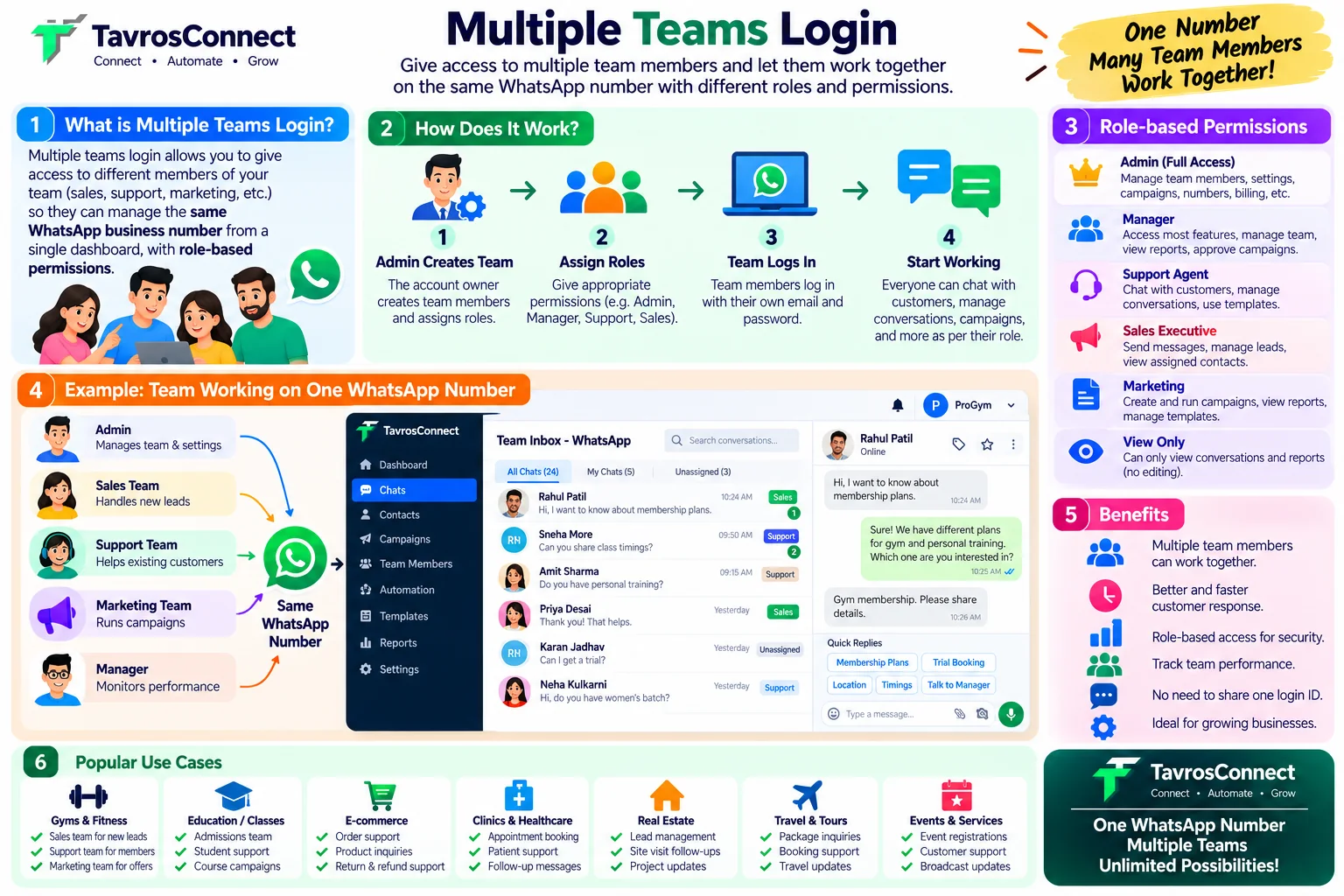
Multiple Teams Login: what it is, how it works, role-based permissions, an example, benefits and use cases
Multiple teams login at a glance. Tap the image to open it full size.

What is multiple teams login?

It lets you give different members of your team (sales, support, marketing and more) their own login to manage the same WhatsApp business number from one dashboard, each with role-based permissions.

How does it work?
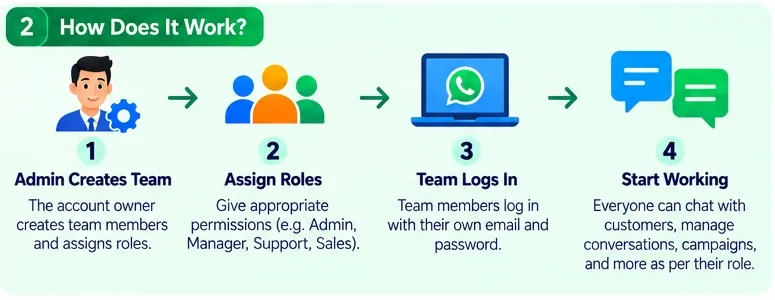
Four steps: the admin creates the team, assigns roles, the team logs in, everyone starts working
Admin creates the team → assigns roles → members log in → everyone starts working.
  1. Admin creates the team — the account owner adds team members.
  2. Assign roles — give the right permissions: Admin, Manager, Support, Sales and so on.
  3. Team logs in with their own email and password.
  4. Start working — everyone chats with customers and manages conversations, campaigns and more, as per their role.

Role-based permissions
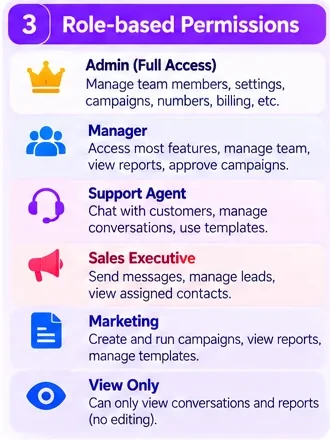
Roles: Admin (full access), Manager, Support Agent, Sales Executive, Marketing, View Only
  • Admin — full access: team, settings, campaigns, numbers and billing.
  • Manager — most features, reports and campaign approvals.
  • Support Agent — chats with customers and uses templates.
  • Sales Executive — sends messages, manages leads and assigned contacts.
  • Marketing — creates and runs campaigns, views reports, manages templates.
  • View Only — can see conversations and reports but not edit.

Example: a team on one WhatsApp number
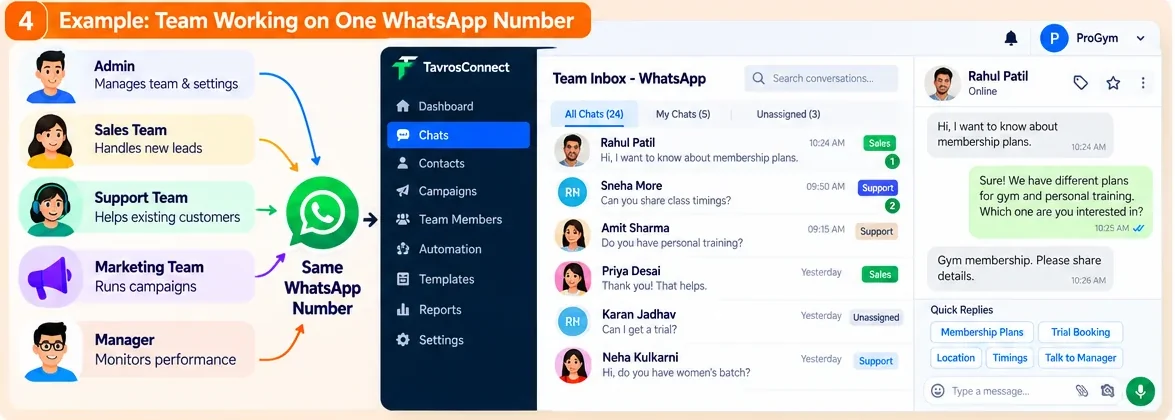
A gym team on one number: admin, sales, support, marketing and manager, with a shared team inbox
Sales handles new leads, support helps members, marketing runs campaigns, the manager watches performance — all on the same number.

Sales picks up new enquiries from the Unassigned list, support answers existing members, marketing runs offers, and the manager checks performance, all in one Team Inbox, with quick replies for common questions.

Benefits
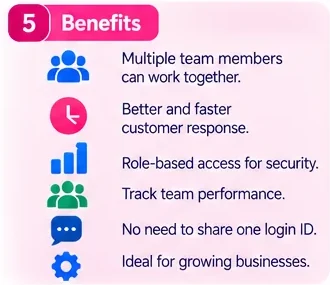
Benefits: multiple team members can work together, better and faster customer response, role-based access for security, track team performance, no need to share one login ID, ideal for growing businesses
Use cases: gyms and fitness, education, e-commerce, clinics, real estate, travel and tours, events and services
Gyms, education, e-commerce, clinics, real estate, travel and events.
Tip: give people the smallest role that lets them do their job. You can always raise it later, and you will never have to share your own login again.
Try it on your own WhatsApp numberFree trial — connect your number and send your first message in minutes.
Start free

एक व्यवसाय, एक WhatsApp नंबर, आणि त्याची गरज असलेले अनेक लोक: सेल्स नवीन चौकशींना उत्तर देते, सपोर्ट विद्यमान ग्राहकांना मदत करते, मार्केटिंग कॅम्पेन चालवते. एकच फोन किंवा एकच पासवर्ड शेअर करणे म्हणजे गोंधळाला आमंत्रण. मल्टिपल टीम लॉगिन हीच अडचण सोडवते.
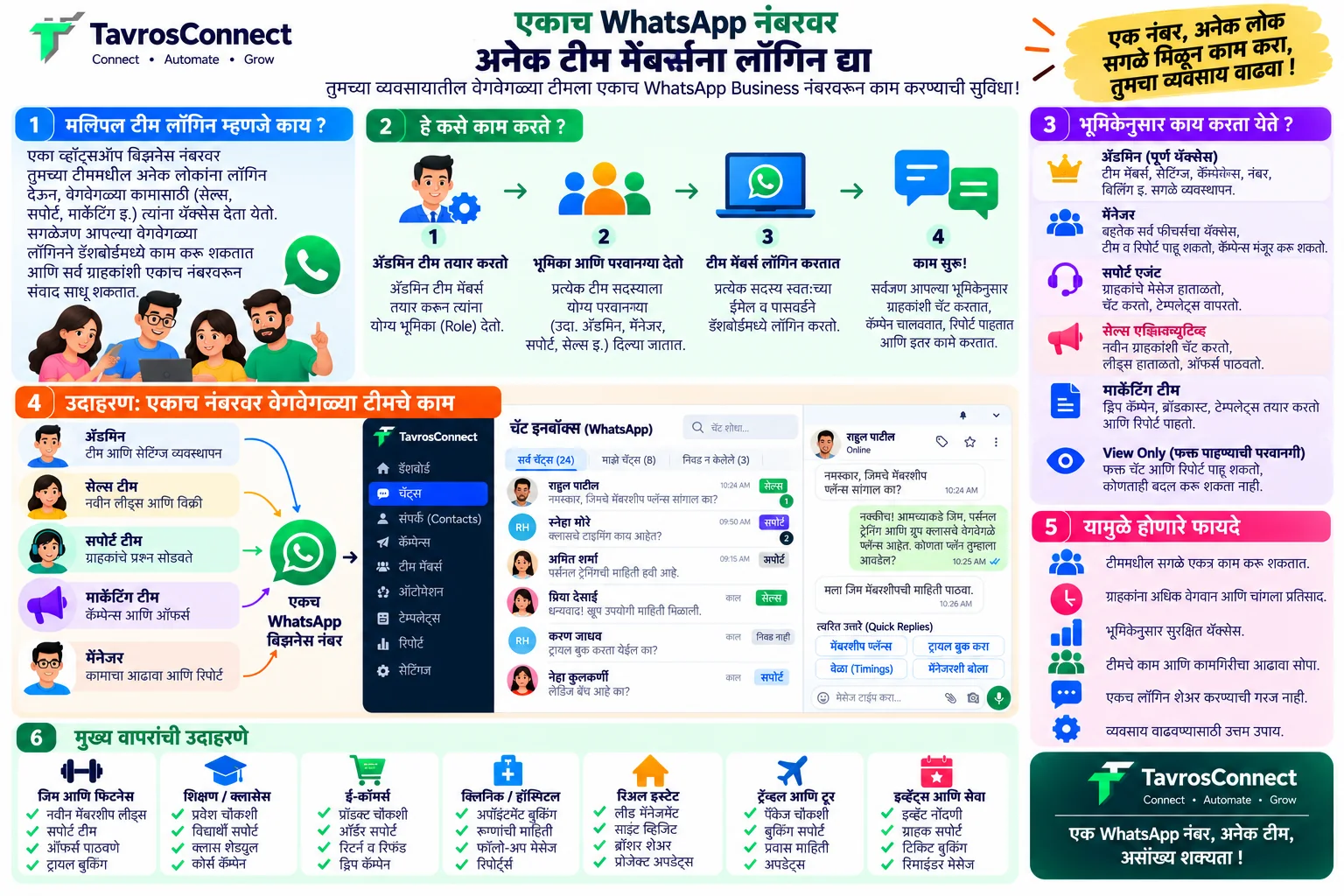
मल्टिपल टीम लॉगिन: ते काय आहे, कसे चालते, भूमिकेनुसार परवानग्या, उदाहरण, फायदे आणि उपयोग
मल्टिपल टीम लॉगिन एका नजरेत. मोठे पाहण्यासाठी चित्रावर टॅप करा.

मल्टिपल टीम लॉगिन म्हणजे काय?

यामुळे तुम्ही तुमच्या टीममधील वेगवेगळ्या सदस्यांना (सेल्स, सपोर्ट, मार्केटिंग इ.) स्वतंत्र लॉगिन देऊ शकता, जेणेकरून ते एकाच WhatsApp बिझनेस नंबरचे व्यवस्थापन एकाच डॅशबोर्डवरून, भूमिकेनुसार परवानग्यांसह करू शकतात.

ते कसे काम करते?
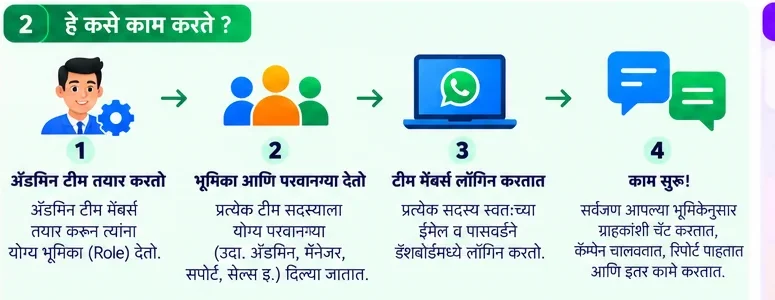
चार पायऱ्या: अॅडमिन टीम तयार करतो, भूमिका देतो, टीम लॉग इन करते, सर्वजण काम सुरू करतात
अॅडमिन टीम तयार करतो → भूमिका देतो → सदस्य लॉग इन करतात → सर्वजण काम सुरू करतात.
  1. अॅडमिन टीम तयार करतो — अकाउंट मालक टीम सदस्य जोडतो.
  2. भूमिका द्या — योग्य परवानग्या द्या: Admin, Manager, Support, Sales इत्यादी.
  3. टीम लॉग इन करते — प्रत्येकाच्या स्वतःच्या ईमेल आणि पासवर्डने.
  4. काम सुरू करा — प्रत्येकजण आपल्या भूमिकेनुसार ग्राहकांशी चॅट, संवाद व्यवस्थापन, कॅम्पेन इत्यादी करतो.

भूमिकेनुसार परवानग्या
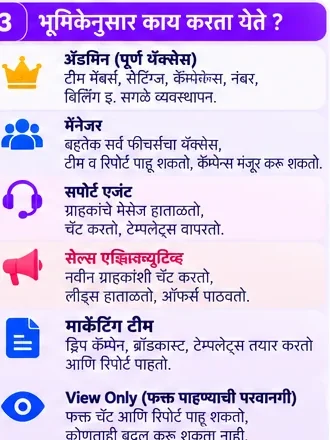
भूमिका: अॅडमिन (पूर्ण अधिकार), मॅनेजर, सपोर्ट एजंट, सेल्स एक्झिक्युटिव्ह, मार्केटिंग, फक्त पाहण्यासाठी
  • Admin — पूर्ण अधिकार: टीम, सेटिंग्ज, कॅम्पेन, नंबर आणि बिलिंग.
  • Manager — बहुतांश सुविधा, रिपोर्ट आणि कॅम्पेन मंजुरी.
  • Support Agent — ग्राहकांशी चॅट आणि टेम्प्लेट्सचा वापर.
  • Sales Executive — मेसेज पाठवणे, लीड्स आणि नेमून दिलेले कॉन्टॅक्ट्स सांभाळणे.
  • Marketing — कॅम्पेन तयार करणे व चालवणे, रिपोर्ट पाहणे, टेम्प्लेट्स सांभाळणे.
  • View Only — संवाद आणि रिपोर्ट पाहता येतात, बदल करता येत नाहीत.

उदाहरण: एकाच WhatsApp नंबरवर टीम
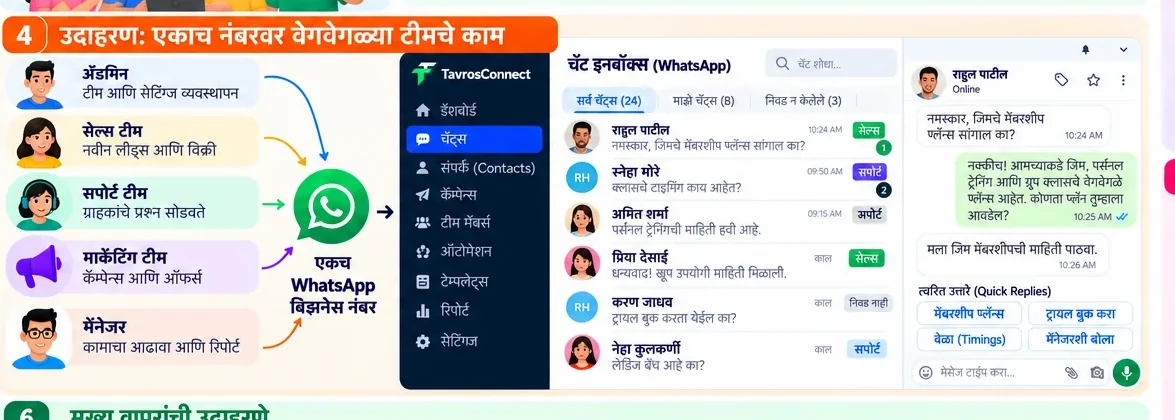
एका नंबरवर जिमची टीम: अॅडमिन, सेल्स, सपोर्ट, मार्केटिंग आणि मॅनेजर, शेअर्ड टीम इनबॉक्ससह
सेल्स नवीन लीड्स हाताळते, सपोर्ट सदस्यांना मदत करते, मार्केटिंग कॅम्पेन चालवते, मॅनेजर कामगिरी पाहतो — सर्व एकाच नंबरवर.

सेल्स Unassigned यादीतून नवीन चौकशी उचलते, सपोर्ट विद्यमान सदस्यांना उत्तर देते, मार्केटिंग ऑफर चालवते आणि मॅनेजर कामगिरी तपासतो — सर्व एकाच टीम इनबॉक्समध्ये, सामान्य प्रश्नांसाठी क्विक रिप्लायसह.

फायदे
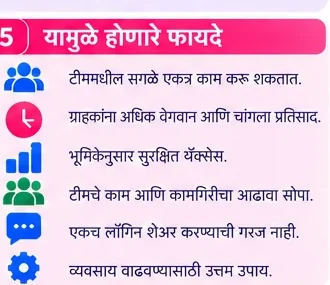
फायदे: अनेक टीम सदस्य एकत्र काम करतात, ग्राहकांना जलद प्रतिसाद, भूमिकेनुसार सुरक्षित प्रवेश, टीमच्या कामगिरीचा मागोवा, एकच लॉगिन शेअर करण्याची गरज नाही, वाढत्या व्यवसायांसाठी आदर्श

लोकप्रिय उपयोग

उपयोग: जिम व फिटनेस, शिक्षण, ई-कॉमर्स, क्लिनिक, रिअल इस्टेट, प्रवास व टूर्स, इव्हेंट्स व सेवा
जिम, शिक्षण, ई-कॉमर्स, क्लिनिक, रिअल इस्टेट, प्रवास आणि इव्हेंट्स.
टीप: प्रत्येकाला त्याचे काम करता येईल एवढीच लहानात लहान भूमिका द्या. ती नंतर वाढवता येते, आणि तुम्हाला तुमचे स्वतःचे लॉगिन पुन्हा कधीही शेअर करावे लागणार नाही.
Try it on your own WhatsApp numberFree trial — connect your number and send your first message in minutes.
Start free
Share:शेअर करा: WhatsApp LinkedIn Post

Keep readingपुढे वाचा

How-to guidesकसे करावे

WhatsApp message templates explained: types, approval and best practicesWhatsApp मेसेज टेम्प्लेट्स सोप्या भाषेत: प्रकार, मंजुरी आणि चांगल्या पद्धती

To start a conversation with a customer on the WhatsApp Business API you need an approved template. Here is what they are, the three categories and how to get approved first time.WhatsApp Business API वर ग्राहकाशी संवाद तुम्ही सुरू करत असाल तर मंजूर टेम्प्लेट आवश्यक असते. ते काय आहे, तीन प्रकार कोणते आणि पहिल्याच प्रयत्नात मंजुरी कशी मिळवायची.

15 Oct 2026१५ ऑक्टोबर २०२६ · 3 min read३ मिनिटे वाचन
Automationऑटोमेशन

What is a WhatsApp chatbot? Answer customers 24x7 without lifting a fingerWhatsApp चॅटबॉट म्हणजे काय? ग्राहकांना २४x७ आपोआप उत्तरे द्या

A WhatsApp chatbot is an automated assistant that answers questions, shows menus, takes bookings and hands over to your team when needed — all day, every day.WhatsApp चॅटबॉट हा एक स्वयंचलित सहाय्यक आहे — तो प्रश्नांची उत्तरे देतो, मेनू दाखवतो, बुकिंग घेतो आणि गरज पडल्यास तुमच्या टीमकडे संवाद सोपवतो.

19 Oct 2026१९ ऑक्टोबर २०२६ · 3 min read३ मिनिटे वाचन

Put it into practice on WhatsAppहे WhatsApp वर प्रत्यक्षात आणा

Create your free account, connect your number and send your first message in minutes.मोफत अकाउंट तयार करा, तुमचा नंबर जोडा आणि काही मिनिटांत पहिला मेसेज पाठवा.

Create free accountमोफत अकाउंट तयार करा